
Wordle to Townscaper
More games like this



WHAT IS WORDLE TO TOWNSCAPER?
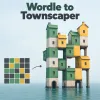
Wordle to Townscaper is a creative tool that turns a Wordle result into a Townscaper building. It reads the familiar green, yellow, and gray squares from your shared result and uses their arrangement to shape the structure. Each set of guesses creates a different pattern, so the finished building reflects the path you took through that Wordle puzzle.
You do not guess a new word here. First, you play Wordle; then, you bring its result to this tool.
HOW TO CREATE A BUILDING FROM YOUR WORDLE RESULT
- Finish a Wordle puzzle and select Share to copy your result.
- Paste the copied text into the Wordle result box.
- Select Parse so the tool can read the colored grid.
- Adjust the building options if you wish, then select Generate.
- Open the resulting Townscaper link to see your building. Use Copy when you want to share the link.
Parse and Generate have separate jobs: the first reads your Wordle result, while the second creates the Townscaper link. If you change an option after generating a building, select Generate again to see its effect.
HOW DOES THE WORDLE PATTERN BECOME A BUILDING?
Colored Squares Become Part of the Design
A shared Wordle result records where green, yellow, and gray squares appeared across your guesses. Wordle to Townscaper translates that arrangement into a structure with green and yellow building blocks. The tool uses the pattern of colors, so you do not need to reveal the answer or the words you entered.
For example, a result with yellow squares scattered through its early rows and a green row at the end gives the tool a different arrangement to work with than a result dominated by green squares from the start. The exact building is best seen by generating and opening its Townscaper link.
Adjusting the Gaps
The tool offers two options: Fill gaps on walls and Remove gaps on ground. These let you change how spaces in the pattern are handled when the building is generated. Try one setting, view the result, then change it and generate another link if you want to compare the shapes.
WHAT MAKES IT INTERESTING?
Wordle's share grid usually tells friends how many attempts you needed without showing the answer. Wordle to Townscaper gives that same grid a second life as a visual creation. It is a simple way to revisit a puzzle you have finished and share the pattern of your guesses in a new form.
Frequently asked questions
Is Wordle to Townscaper a Wordle guessing game?
Does it show the Wordle answer?
Can I change how my building looks?
Can I share the finished building?
